

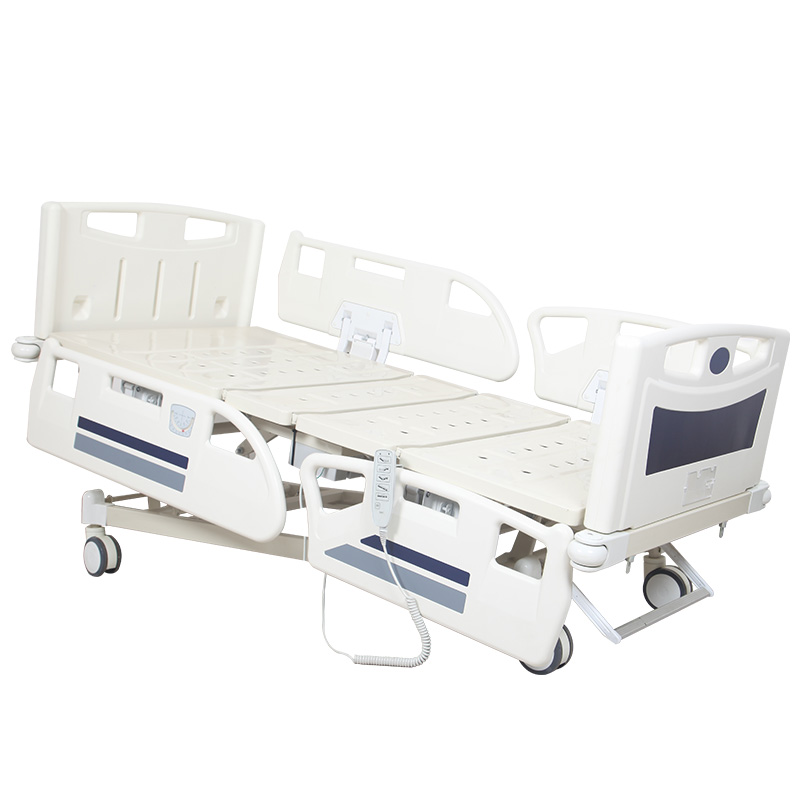
Modern electric hospital beds may provide several powered movements through a patient handset, side rail controls, caregiver panel or other control interface. But hospitals do not always want every available movement to remain accessible from every control at all times. This is where function lockout becomes an important specification. For hospital buyers, the key question is not simply: “Does this electric hospital bed have a lock function?” A more useful technical question is: “Which functions can be locked, who can lock them, which control interfaces are affected, and how are they restored?” When comparing an electric hospital bed, buyers should treat function lockout as an independent part of the control architecture rather than assuming it is included with every electric or ICU bed. A practical evaluation sequence is: Control Interfaces → Available Movements → Lockable Functions → Lockout Authority → Locked-State Behavior → Unlock Method → Supplier Demonstration → Sample Verification. Function lockout is a control feature that can restrict selected electrically powered bed movements according to the design of the control system. Depending on the exact model, the lockout system may allow authorized staff to prevent selected movements from being operated through one or more control interfaces. The exact functions, control authority and operating method vary between products. Therefore, the term “function lockout” should never be treated as a universal specification with identical behavior across all electric hospital beds. An electric hospital bed may provide several adjustable positions. At the same time, a hospital may require greater control over which movements remain available from the patient-accessible controls. For procurement teams, this creates several questions: These questions should be answered for the exact proposed model. An electric bed has powered adjustment, but powered adjustment does not automatically mean that a dedicated lockout system is included. Ask the supplier to confirm: Does this exact model provide function lockout? Higher-specification ICU beds may use more advanced control systems, but the phrase “ICU bed” does not define the exact lockout architecture. Different models can use different: Verify the quoted model rather than the product category alone. Before evaluating lockout, first identify how the bed can normally be operated. Depending on the model, controls may include: The lockout system should be evaluated in relation to these interfaces. Some electric bed designs provide different control permissions for patients and caregivers. A patient-accessible control may provide routine movement buttons, while a staff control may provide additional functions or restriction settings. The exact arrangement should be confirmed from the manufacturer. A specification that states only “function lockout available” is incomplete. Ask: Which control interface is used to activate the lockout? If the purpose of the lockout is to restrict a patient-accessible movement, the buyer should understand whether the same patient control can restore it. Do not assume the answer. Depending on the control design, staff may use a dedicated panel, key, button combination or another manufacturer-defined method. The supplier should explain the actual configuration. Do not accept a generic statement such as: “All functions can be controlled.” Ask the supplier to identify the actual lockable movements. Depending on the model, these may involve: If backrest restriction is required by the purchasing specification, confirm it individually. Do not assume that a general lock symbol automatically includes the backrest actuator. Ask the same question for the lower platform movement. A control system may provide different permissions for different actuators. Height adjustment is another important movement to verify. If the project requires staff control over bed height, state that requirement explicitly. For beds providing Trendelenburg, reverse Trendelenburg or another whole-bed tilt function, ask whether these movements are included in the lockout architecture. A bed may provide several electric movements while allowing lockout for only some of them. The available movements and lockable movements should therefore be listed separately. Some systems may allow selected functions to be restricted individually. Other systems may use a broader control restriction. Buyers should determine which architecture the proposed model uses. This is especially useful when the procurement requirement calls for selective control. For example, a project may need one movement restricted while another remains available. Do not assume selective lockout is possible unless the supplier confirms it. If individual function lockout is available, determine whether several restrictions can remain active simultaneously. A global restriction, where provided, should be distinguished from individual actuator lockout. Record both separately if the product offers them. A useful demonstration should show what happens when the user presses a button for a locked function. The buyer should be able to see whether: The exact behavior depends on the model. Some control architectures may allow authorized staff to retain control while patient controls are restricted. Others may behave differently. Ask the manufacturer to demonstrate the exact logic. Two beds may both advertise function lockout but operate differently. For example, they may differ in: Therefore, a simple Yes/No comparison is not enough. This distinction is essential. Function lockout controls whether selected movements are available for operation according to the control design. An emergency stop function, where provided, is intended to stop or interrupt defined powered operation according to the manufacturer's design. These should be listed as separate specifications. Supplier terminology can vary. If a datasheet uses the phrase “safety lock,” ask what the control actually does. Do not classify it based only on the name. A CPR-related function has a different purpose from restricting electric movement controls. CPR and lockout should have separate lines in the technical specification. Emergency lowering concerns an alternative manufacturer-defined method of adjustment under defined conditions. Lockout concerns control permission. Battery backup concerns electrical power availability. It does not define who can operate a bed function. The word “lock” can create confusion. A side rail may use a mechanical locking mechanism when raised. That is different from electrical function lockout. Likewise, locking a caster or central braking system is unrelated to electrical function permissions. Instead of writing: “Hospital bed with safety lock.” write a more specific requirement such as: “Please confirm whether selected electric bed functions can be locked from patient operation and identify the control used by staff.” A clear photo can show: A close-up of one lock symbol may not provide enough context. Request an image of the complete panel or handset. Depending on the control design, the system may provide an indicator showing that a function is restricted. If this is important to the project, ask how the status is displayed. Indicator colors and symbols can differ between manufacturers. Evaluate their meaning according to the product documentation. If selective lockout is available, determine how staff can identify which functions are currently restricted. If a lockout state has been activated, buyers may want to know what happens after normal mains power is removed and restored. The answer depends on the control architecture. Ask the manufacturer rather than assuming the setting is retained or cleared. If the bed includes a backup power system, ask whether lockout behavior remains the same during backup operation. Power source and function authority are separate concepts unless the manufacturer specifies otherwise. This can be relevant to operational workflow. The product documentation should define the actual behavior. Follow the manufacturer's operating instructions when verifying lockout, power interruption or backup operation. Do not bypass controls or modify wiring. The feature should be understood as part of a system: Control Interface → Control Logic → Control Box → Actuator → Bed Movement. Changing one part of this architecture can potentially affect available functions. Do not assume that another handset can be substituted simply because the connector looks similar. Use only manufacturer-approved compatible components. If the supplier offers several panel configurations, ask which one is included in the quotation. Control boxes can support different configurations. If function lockout is a mandatory requirement, make sure the approved control box and related components support it. A photograph can show buttons, but it cannot fully demonstrate control logic. Request an operation video. A useful lockout demonstration can show: If several movements can be locked individually, a sequential demonstration is easier to evaluate than a general product video. A demonstration from another electric bed does not prove that the quoted model uses the same control logic. The functions shown in the demonstration should correspond to the functions stated in the technical specification. The control system shown should also correspond to the configuration included in the commercial quotation. A supplier may offer the same bed platform with different control-system levels. Ask whether lockout is: Supplier A may include an advanced staff control panel with selective function lockout. Supplier B may quote a simpler handset-only configuration. If so, the two prices are not based on identical control systems. Instead of using only: Lockout: Yes / No use several fields. If a supplier does not explain whether a function can be locked, mark it as: Not Confirmed – Supplier Clarification Required. A supplier may simply have omitted the detail from a short datasheet. Ask before concluding that the feature is unavailable. If function lockout is important to the procurement project, request the relevant operating or control information available for the exact model. The manufacturer's instructions can help clarify: If the control panel uses a lock symbol, the instructions should explain its purpose. Descriptions such as: do not explain the actual control behavior. Translate marketing terms into measurable functions. If the project requires this feature, verify it on the physical sample before mass production where practical. Before activating lockout, confirm that the required electric movements operate normally according to the approved configuration. Follow the manufacturer's defined procedure. Verify that the selected movement behaves as documented when the lockout is active. If selective lockout is specified, confirm that unrelated permitted functions behave according to the manufacturer's design. If staff are intended to retain authority, verify the documented control behavior. Use the manufacturer-defined unlock method. After the function is restored, confirm that normal operation returns according to the approved configuration. Do not assume that because one actuator can be locked, every other actuator behaves identically. Document the: Approving the bed frame and appearance without recording the control configuration can leave an important specification undefined. If the supplier later proposes another handset, control panel or control box, review whether the change affects: Two control panels may look similar but support different functions. If function lockout is a contractual requirement, include it in the agreed inspection scope. Verify that the production units use the approved control interface and configuration. Control symbols and labels should correspond to the approved configuration. Where function testing forms part of the agreed inspection, follow the defined procedure rather than improvising tests. If the hospital receives beds with function lockout, staff should understand: Lockout methods can differ between brands and models. If a hospital uses several electric bed models, staff should be able to distinguish their control systems. A technical control feature is one part of the bed's operation. It does not replace the hospital's own training and operating procedures. Avoid unauthorized changes to wiring, control panels, handsets or control boxes. Such changes can alter the intended control behavior. Restricts selected electric movements according to the control architecture. Stops or interrupts defined powered operation according to the manufacturer-defined emergency control design where provided. Provides a separate manufacturer-defined CPR-related operation or positioning function. Provides a manufacturer-defined alternative method of adjustment under defined conditions when applicable. Provides an alternative power source where included. Defines or manages permitted movement limits according to the product architecture. These functions may exist together, but they should be specified and verified independently. No. Function lockout depends on the exact control architecture and product configuration. Buyers should confirm the feature for the quoted model. The available lockout functions depend on the model. They may include selected powered movements such as backrest, leg, height or other positioning functions, but buyers should request a model-specific list. Some control systems may provide selective function lockout, while others use a different restriction method. Do not assume individual lockout unless the supplier confirms it. This depends on the bed design. Some models may provide staff-oriented control through a nurse or caregiver panel, while other configurations use different methods. No. Function lockout restricts access to selected movements, while emergency stop is a separate emergency-control function where provided. No. CPR-related operation and function lockout have different purposes and should be listed separately. The behavior depends on the control system and backup-power configuration. Ask the manufacturer to confirm the exact model rather than assuming. Function lockout should not be treated as a small icon on a control panel or a simple Yes/No item in a supplier datasheet. For hospital procurement, the important questions are: Which Functions → Locked by Whom → From Which Control → Affecting Which Interface → With What Indication → Restored How? The better purchasing process is: Identify the Required Movements → Identify Patient and Staff Controls → Define Required Lockout Authority → Compare Supplier Control Systems → Review Demonstration → Verify Sample → Freeze the Approved Configuration → Verify Production. This allows buyers to compare the actual control architecture rather than relying on broad phrases such as “safety lock” or “advanced nurse control.” Hebei Heyuan Medical Equipment Co., Ltd. manufactures electric hospital beds with different actuator, handset, control panel and positioning configurations for hospitals, distributors and healthcare projects. If your project requires a specific electric hospital bed control system, please contact us with your required functions, quantity and technical specifications.Electric Hospital Bed Function Lockout: What Buyers Should Check
What Is Function Lockout on an Electric Hospital Bed?
Why Can Function Lockout Matter to Hospital Buyers?
1. Do Not Assume Every Electric Hospital Bed Has Function Lockout
2. Do Not Assume Every ICU Bed Uses the Same Lockout System
3. Identify Every Control Interface on the Bed
4. Patient Controls and Staff Controls May Have Different Authority
5. Ask Who Can Activate Function Lockout
6. Ask Whether the Patient Can Unlock the Function
7. Ask Whether Staff Have a Separate Unlock Method
8. Ask Which Functions Can Be Locked
9. Can Backrest Adjustment Be Locked?
10. Can Leg Adjustment Be Locked?
11. Can Height Adjustment Be Locked?
12. Can Whole-Bed Tilt Be Locked?
13. Do Not Assume Every Function Is Lockable
14. Individual Function Lockout and Global Lockout Are Different
15. Ask Whether Functions Can Be Locked Individually
16. Ask Whether Multiple Functions Can Be Locked at the Same Time
17. Ask Whether There Is a Global Lockout
18. What Happens to the Patient Handset After Lockout?
19. What Happens to the Staff Control After Lockout?
20. Lockout Authority Is as Important as Lockout Availability
21. Function Lockout Is Not the Same as Emergency Stop
22. Do Not Use “Safety Lock” and “Emergency Stop” as Interchangeable Terms
23. Function Lockout Is Not CPR
24. Function Lockout Is Not Emergency Lowering
25. Function Lockout Is Not Battery Backup
26. Function Lockout Is Not a Mechanical Side Rail Lock
27. Function Lockout Is Not a Caster Brake
28. Use Precise Terminology in the RFQ
29. Ask for a Photo of the Lockout Control
30. Ask for the Complete Control Panel Photo
31. Check Whether Lockout Status Is Visually Indicated
32. Do Not Assume Every Indicator Uses the Same Color
33. Ask Whether Each Locked Function Has Its Own Indicator
34. Ask What Happens After Power Is Disconnected
35. Ask What Happens When Backup Power Is Used
36. Do Not Assume Battery Operation Changes Control Permissions
37. Ask Whether Lockout Settings Are Retained After a Power Cycle
38. Do Not Test Electrical Behavior by Improvising
39. Function Lockout Depends on the Control Architecture
40. A Different Handset May Change Available Controls
41. A Different Control Panel May Change Lockout Capability
42. A Different Control Box May Change the System Architecture
43. Do Not Approve Lockout Based Only on a Handset Photo
44. What Should the Operation Video Show?
45. Ask the Supplier to Demonstrate Functions One by One
46. The Video Should Show the Exact Quoted Model
47. Match the Video to the Datasheet
48. Match the Video to the Quotation
49. Function Lockout Can Be Standard or Optional
50. Do Not Compare Prices Until the Control Configuration Is Normalized
51. Add Lockout to the Supplier Comparison Sheet
52. Suggested Function Lockout Comparison Fields
53. Use “Not Confirmed” Instead of Guessing
54. Missing Information Is Not the Same as “No”
55. Ask for Technical Documentation Where Required
56. Review the User Instructions
57. Product Labels and Documentation Should Match
58. Avoid Vague Marketing Terms
59. Function Lockout Should Be Evaluated During Sample Inspection
60. Start With Normal Bed Operation
61. Activate One Lockout Function
62. Try the Affected Control
63. Check the Other Functions
64. Check the Staff Control
65. Restore the Function
66. Verify Normal Operation Again
67. Repeat the Process for Other Required Lockable Functions
68. Record the Sample Configuration
69. Sample Approval Should Include the Control System
70. Prevent Unreviewed Control Changes During Production
71. Similar Appearance Does Not Prove Identical Control Logic
72. Include Lockout in Pre-Shipment Verification Where Required
73. Check Production Controls Against the Approved Sample
74. Check Function Labels
75. Verify Selected Units According to the Inspection Plan
76. Staff Training Should Include Lockout Operation
77. Do Not Assume Staff Familiar With One Bed Will Understand Another
78. Mixed Bed Fleets Need Clear Model Identification
79. Do Not Use Lockout as a Substitute for Staff Procedures
80. Do Not Modify the Lockout System Without Manufacturer Approval
Function Lockout vs Other Electric Hospital Bed Controls
Function Lockout
Emergency Stop
CPR Function
Emergency Lowering
Battery Backup
Limit Control
Electric Hospital Bed Function Lockout Buyer Checklist
Do All Electric Hospital Beds Have Function Lockout?
What Hospital Bed Functions Can Be Locked?
Can Hospital Bed Functions Be Locked Individually?
Who Controls Function Lockout on an Electric Hospital Bed?
Is Function Lockout the Same as Emergency Stop?
Is Function Lockout the Same as CPR?
Does Function Lockout Work During Battery Operation?
What Should Buyers Ask the Supplier?
Final Advice for Electric Hospital Bed Buyers