

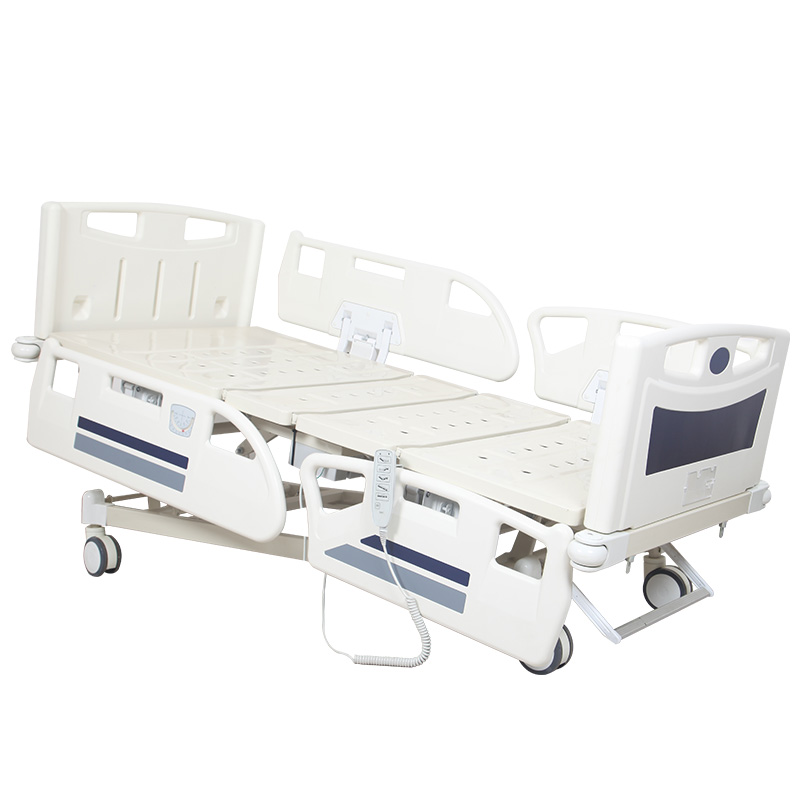
The caregiver presses the backrest-up button. The backrest begins to rise. The caregiver releases the button. But the bed keeps moving. They press another button. The movement may stop. Or it may continue. Another time, the same problem appears during height adjustment. The immediate reaction is: "The motor is out of control." But the actuator is only one part of the electrical system. The command may begin at the handset, travel through the cable and connector, enter the control system and then activate the relevant actuator. If an electric Hospital Bed continues powered movement after a control has been released, it should not simply be treated as an inconvenience. The abnormal movement should be stopped according to the manufacturer's instructions and the bed should be appropriately assessed before normal powered use continues. The key troubleshooting question is not only “Which motor is moving?” It is “Why is the electrical system still receiving or producing a movement command?” Start with the simplest visible possibility. Without dismantling the handset, observe whether: A control that does not mechanically return as intended deserves immediate attention. Identify the pattern. This distinction can help qualified service personnel narrow the diagnostic path. The handset may look normal while the cable has been damaged. Look for: Do not continue using visibly damaged electrical controls. An adjustable hospital bed changes geometry every time it moves. Inspect whether the handset or other accessible cables are: Correct cable routing should be maintained according to the bed manufacturer's design. A loose, damaged or contaminated connection can contribute to abnormal control behavior depending on the electrical system. Qualified personnel should inspect connectors according to the manufacturer's service instructions. Look for documented evidence of: If the manufacturer permits this diagnostic method, an approved compatible handset can help separate a handset problem from another control-system problem. Do not plug in a handset simply because the connector appears to fit. Electrical compatibility must be confirmed for the specific bed and control system. If the handset is confirmed to be functioning correctly but abnormal movement continues, qualified service personnel may need to investigate the control system. Depending on the bed design, it may receive inputs from: Internal electrical diagnosis should follow the manufacturer's technical documentation. Advanced electric hospital beds may have several places from which movement can be commanded. Depending on the model, check whether the bed includes: An abnormal command may not necessarily originate from the control currently being held by the caregiver. The handset deserves immediate inspection. Document the affected control and movement direction. The investigation may need to look beyond a single button or actuator. Cable or connector condition deserves closer attention. Qualified service personnel should investigate other components in the control chain. This should be treated as abnormal unintended powered movement. Do not continue normal patient positioning while the control behavior is unpredictable. Depending on the specific bed, this may involve an emergency-stop or another manufacturer-defined method. Do not improvise an electrical isolation procedure. Follow the facility's safety procedure and obtain appropriate assistance where required. Clearly identify the bed so another caregiver does not unknowingly continue using the affected function. Do not report only: "Bed malfunction." Report: "Backrest continued rising after the UP button was released. Other functions appeared normal." Repeated commands can make an abnormal situation harder to interpret. Physical impact is not a repair method. Electrical service should follow the manufacturer's instructions and be performed by appropriately qualified personnel. Similar connectors do not prove compatibility. Protective controls should not be defeated to keep the bed operating. An actuator that continues moving may simply be responding to a command from elsewhere in the control system. Which function moved? Which direction? Handset? Side rail? Footboard? Did it return normally after release? Look for visible damage or pinching without dismantling electrical components. Determine whether the bed has additional command sources. Do not continue repeated testing with a patient in the bed. A qualified technician may compare an approved compatible handset or other component according to the service procedure. If the external control is not the cause, investigate the remaining electrical command path using manufacturer-approved procedures. This is important. If safe and appropriate to document the fault, show: The technician needs to understand the complete control sequence. Do not deliberately reproduce unsafe movement repeatedly, but document whether the issue has occurred more than once and under what conditions. Confirm that each specified movement responds appropriately. Movement should follow the intended control logic of the specific bed. Operate the bed through the agreed functional test and check whether accessible cables remain properly routed. Do not test only the patient handset if the bed also includes caregiver controls. A correctly functioning golden sample does not prove the complete production batch has been wired and assembled consistently. Look at the button. Identify the affected function. Inspect the handset cable. Check cable routing. Check the connector. Identify other control interfaces. Then investigate the control system using the approved technical procedure. An electric hospital bed actuator normally moves because it has received a command. When movement continues unexpectedly, good troubleshooting follows that command path backward instead of immediately replacing the motor at the end of it. When reporting unintended movement to the supplier, record four details in the same message: which button was pressed, which direction the bed moved, whether the button physically returned after release, and whether the movement stopped when the bed was isolated according to its approved procedure. These details are much more useful for diagnosis than simply reporting “the motor won't stop.” You can explore our Electric Hospital Bed range for hospital projects requiring powered positioning, replaceable control components and practical electrical configurations. You can also review our Factory information when evaluating electrical assembly, cable routing, control-system installation and functional testing. If an electric hospital bed continues moving after a control button is released, Contact Us with the bed model, affected function and a short fault video so the control path can be evaluated before replacement parts are ordered.If the Bed Keeps Moving After You Release the Button, Treat It Differently From a Normal “Motor Not Working” Fault
8 Things to Check When an Electric Hospital Bed Keeps Moving After the Button Is Released
1. Check Whether the Handset Button Is Physically Stuck
Press and Release the Button Normally
2. Check Whether the Problem Follows One Specific Button
For Example:
3. Check the Handset Cable
Inspect Accessible Cable Areas
4. Check Whether the Cable Is Being Pinched by the Moving Bed
Cable Routing Matters
5. Check the Handset Connector
Do Not Open Electrical Components Without Authorization
6. Check Whether the Problem Remains With an Approved Replacement Handset
Use Only Confirmed Compatible Components
7. Check the Control Box or Control System
The Control Box Is the Command Center
8. Check Whether the Bed Has More Than One Control Interface
Do Not Diagnose the Handset in Isolation
The Failure Pattern Can Tell You Where to Look First
One Button Physically Stays Depressed
One Function Keeps Moving but All Other Functions Behave Normally
Do Not Replace Every Electrical Component
Several Functions Behave Abnormally
The Problem Appears Only When the Cable Is in a Certain Position
The Handset Is Replaced but the Problem Continues
The Bed Moves Without Anyone Touching the Handset
Follow the Manufacturer's Procedure to Stop Use and Arrange Technical Assessment
What Should Staff Do When Unintended Movement Happens?
First: Stop the Activity
Second: Use the Bed's Approved Stop or Isolation Procedure
Follow the Instructions for the Actual Model
Third: Protect the Patient From Further Unintended Movement
Fourth: Remove the Bed From Normal Powered Service if Required
Fifth: Record Exactly What Happened
Do Not Use These Troubleshooting Shortcuts
Do Not Keep Pressing Different Buttons to See What Happens
Do Not Hit the Handset
Do Not Open the Handset With the Bed in Normal Service
Do Not Swap Random Handsets Between Beds
Do Not Bypass an Emergency Stop or Lockout System
Do Not Replace the Actuator First
Use This Troubleshooting Sequence to Avoid Replacing the Wrong Part
Step 1: Identify the Exact Movement
Step 2: Identify the Control That Was Used
Step 3: Observe the Button
Step 4: Inspect Accessible Cables
Step 5: Record Other Control Interfaces
Step 6: Isolate the Bed According to the Approved Procedure
Step 7: Use Approved Diagnostic Components Where Permitted
Step 8: Escalate to the Control System if Necessary
A 30-Second Video Can Save Days of Incorrect Diagnosis
Show the Handset and the Bed in the Same Frame
Technical Support Needs to See Cause and Response Together
Do Not Send Only a Video of the Motor
Record Whether the Problem Is Repeatable
Buyers Should Inspect the Control System Before Shipment
Test Every Handset Button
Check Button Release Behavior
Inspect Cable Routing
Check Multiple Control Panels Where Provided
Sample Multiple Production Beds
Hospital Bed Control-System Inspection Checklist
Handset
Function Test
Cable Management
Control System
10 Questions Buyers Should Ask About Electric Hospital Bed Controls
Handset Questions
Control-System Questions
After-Sales Questions
If the Motor Keeps Running, Do Not Assume the Motor Is the Problem
Expert Tip