

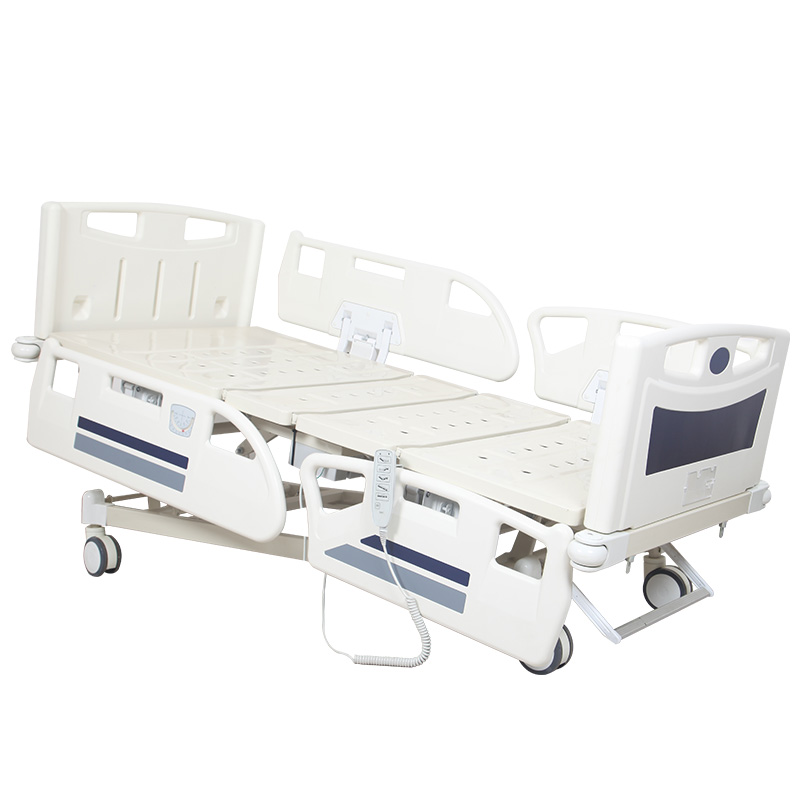
An electric hospital bed is supposed to make positioning easier. But adding electric motors does not automatically make a bed easy to use. A patient may see eight or ten similar buttons and have no idea which one raises the backrest. A nurse may press a button and discover that the function has been locked. The handset may fall between the mattress and side rail. The cable may be too short to reach the patient's preferred hand. Symbols may look clear to the product designer but confusing to elderly patients. And on beds with several positioning functions, patients may be given access to controls they do not actually need. These problems are easy to overlook during procurement because the control system occupies only a small part of the product specification. In daily hospital use, however, it is one of the components patients and caregivers interact with most frequently. When comparing an Hospital Bed, buyers should therefore evaluate not only what the electric system can do, but also whether patients and staff can understand and control those functions quickly. A common assumption is that more buttons mean a more advanced hospital bed. For patients, the opposite can sometimes be true. For trained nurses, this may be manageable. For an elderly patient using the bed for the first time, the same controller may feel unnecessarily complicated. The patient does not necessarily require access to every function available on the bed. For many users, the most frequently needed controls may simply be: A good control architecture can provide a simpler patient interface while allowing trained caregivers to manage the full range of bed functions. Hospital bed controls frequently rely on symbols instead of written instructions. This makes sense because the same product may be sold into many countries. But symbols still need to be intuitive. Ask someone who has never used the bed before to identify the backrest, leg, and height controls. If they need a long explanation, the interface deserves another look. A perfectly designed remote control is useless if it is on the floor. The bed should provide a practical location for storing or attaching the handset when it is not being held. During sample testing, place the handset where it would normally be stored. Then ask whether the patient could realistically reach it without twisting excessively, stretching across the bed, or trying to climb toward the side rail. If patients can comfortably make simple permitted adjustments themselves, they may need less staff assistance for routine comfort changes. Cable length seems like a small specification until the bed is actually used. Long, poorly managed cables may become tangled around rails, bedding, or moving bed structures. The correct design should provide enough reach while maintaining organized cable routing. An electric hospital bed contains multiple moving sections. If the handset cable crosses a hinge, rail mechanism, or lifting structure, repeated bed movement may damage the cable. Good cable routing reduces both inconvenience and unnecessary wear. An electric hospital bed may offer functions intended primarily for trained caregivers. Giving every user unrestricted access is not always appropriate. A caregiver control panel or compatible control system may allow selected patient functions to be disabled while retaining other permitted movements. The choice should not always be between “everything works” and “nothing works.” A patient may safely use the backrest adjustment while another function remains caregiver-controlled. This is much more useful procurement information than simply asking whether the bed has a lock button. A nurse presses the backrest button. Nothing happens. The first assumption may be: “The motor is broken.” But the function may simply be locked. Depending on the control system, useful indicators may include: If a function is unavailable intentionally, the control system should make that status as understandable as possible. Patients and nurses use electric hospital beds for different reasons. Some electric hospital beds therefore combine patient controls with a separate caregiver or footboard control panel. A footboard panel allows caregivers to access bed functions from a central staff-controlled location. Buyers should verify the quoted configuration instead of assuming every footboard panel includes the same functions. Button design becomes particularly important for elderly patients or users with reduced hand strength. Patients should be able to distinguish and operate permitted controls without needing excessive finger precision. A hospital-bed handset is not used only once. It may be touched and cleaned repeatedly throughout its service life. During procurement, ask what printing, membrane, or labeling method is used and how the controller should be cleaned. The handset is a relatively small component, but its failure can remove convenient access to several electric functions. Two handsets that appear similar may not necessarily provide the same functions or control logic. The correct replacement should match the approved bed control system. The handset does not directly define the complete capability of an electric hospital bed. A good-looking handset does not compensate for an unsuitable control architecture. Integrated side rail controls can solve some handset-storage problems. A control panel built into the rail may be difficult for some users to see or reach depending on body position and rail design. There is no universal answer. The best configuration depends on the patient population and hospital workflow. This deserves specific discussion during procurement. Whole-bed height affects not only comfort but also patient entry, exit, transfer, and caregiver working position. Do not assume the factory default should automatically become the final hospital configuration. Trendelenburg and reverse Trendelenburg are not simply everyday comfort buttons for all patients. Clear separation makes the interface easier to understand. Some electric bed systems offer predefined or combined movements. However, buyers should verify exactly what moves, who can activate it, and whether the function is appropriate for the intended care environment. Every additional control creates another decision for the user. A smaller number of well-designed controls can be more valuable than a crowded interface. Hospital rooms are not always brightly lit. If the controller includes illumination, check whether it improves visibility without becoming unnecessarily distracting. When a user presses a control and receives no feedback, they may press repeatedly. The interface should communicate clearly enough that users understand whether the command has been activated. A controller should not be tested only by healthy young adults. An interface that works well in a showroom may be difficult for the people who actually need the bed. Some patients may be unable to operate electric functions safely or reliably. The same hospital bed may be used by a fully independent patient one week and a highly dependent patient the next. A hand controller is frequently touched. Its shape should therefore be considered from a maintenance perspective as well. Electrical controls should not be treated as though every cleaning method or chemical is automatically compatible. This can affect long-term maintenance cost. This reduces confusion when replacement components are needed several years later. A connector that physically fits does not automatically confirm electrical or functional compatibility. This is particularly important for distributors maintaining several similar electric bed models. Hospitals sometimes buy different electric beds for different wards. If every model has completely different controls, staff must repeatedly relearn basic operation. The goal is not absolute uniformity, but avoiding unnecessary variation. Hospital staff may operate bed controls while wearing gloves. This simple test can reveal usability issues before bulk procurement. Do not assume every patient uses the same hand or every nurse approaches from the same side. Room layout, patient condition, and equipment placement can all affect where the controller is used. A handset that is easy to reach while the patient lies flat may become difficult to reach after the backrest rises. This is one of the simplest usability tests available. Note which buttons cause hesitation and which symbols are misunderstood. A good interface should make the most common functions relatively easy to identify. Young purchasing staff are not always representative of the patient population. A geriatric ward and a general surgical ward may provide very different feedback. The patient interface is only half of the control-system evaluation. A feature that takes too many steps may be used less consistently during busy shifts. Motor quality is important, but the patient's everyday experience occurs through the complete control system. It also requires: A five-function hospital bed with confusing controls can be less practical than a simpler bed whose functions are easy to access correctly. A weak specification says: “Electric hospital bed with handset.” This leaves many important questions unanswered. Otherwise suppliers may quote very different configurations under the same description. Electric hospital beds are becoming more capable, but greater capability should not automatically mean greater complexity for the user. A patient should not have to study a technical manual simply to raise the backrest. A nurse should not need to search the room for a fallen handset. A caregiver should not have to guess whether a function is broken or merely locked. And a hospital should not discover several years after purchase that a damaged controller is difficult to replace. The control system should make the bed easier to use, not make simple positioning tasks harder. For procurement teams, this means evaluating the handset, patient permissions, caregiver controls, cable routing, lockout system, component replacement, and user feedback as one complete system. When two electric hospital beds offer similar movements, the bed with the clearer and more practical controls may deliver a much better daily experience for both patients and staff. During sample approval, do not explain the handset first. Give it to three people who have never operated the bed and ask them to raise the backrest, adjust the legs, and identify the bed-height control. Then ask an experienced nurse to lock one function and restore it. Record every moment of hesitation. A two-minute control test often reveals more about real usability than a long list of electric-bed specifications. You can review our Factory information to learn more about electric hospital bed assembly, control-system installation, function testing, and production inspection. If you are sourcing electric hospital beds for hospitals, distributors, healthcare projects, or tenders, Contact Us to discuss patient handsets, caregiver control panels, function lockouts, emergency controls, actuator systems, and suitable electric hospital bed configurations.If Patients Keep Calling a Nurse Just to Adjust the Bed, the Control System May Be the Problem
Problem 1: Too Many Buttons Make Simple Functions Look Complicated
A Five-Function Bed May Need Controls For:
That Can Quickly Become a Large Button Panel
Separate Patient Needs From Caregiver Needs
Advanced Clinical Functions Can Remain Under Staff Control
Problem 2: The Icons Look Obvious to the Manufacturer but Not to the Patient
Common Sources of Confusion Include:
Do Not Test the Controller Only With Engineers
Problem 3: The Patient Cannot Reach the Handset
Handsets Commonly End Up:
Control Placement Is Part of Bed Usability
Check the Patient's Reach From a Real Sleeping Position
A Reachable Control Can Support Independence
Problem 4: The Handset Cable Is Too Short
A Short Cable May Prevent the Controller From Reaching:
But Excessive Cable Length Can Create Another Problem
Problem 5: The Cable Gets Caught in the Side Rail or Moving Mechanism
During Sample Testing:
The Cable Should Not Need Constant Manual Repositioning
Problem 6: Patients Can Operate Functions They Should Not Be Using Independently
Depending on the Bed and Care Environment, Staff May Need to Restrict:
This Is Where Function Lockout Becomes Important
Lockout Should Be Selective Where Possible
Ask Which Functions Can Be Locked Individually
Problem 7: Staff Do Not Know Why a Button Suddenly Stopped Working
The Interface Should Make Status Clear
The User Should Not Have to Guess
Problem 8: Patient and Caregiver Controls Are Identical Even Though Their Jobs Are Different
A Patient Usually Wants To:
A Caregiver May Also Need To:
One Interface Does Not Necessarily Need to Serve Both Users
When Is a Footboard Control Panel Useful?
Depending on the Model, It May Provide:
The Exact Capabilities Depend on the Bed Model
Problem 9: Buttons Are Too Small, Flat or Difficult to Press
Check:
A Beautiful Flat Panel Is Not Automatically Easier to Use
Problem 10: The Labels Wear Off After Repeated Cleaning
Over Time, Poor-Quality Markings Can:
Evaluate the Durability of the Interface
Problem 11: The Handset Breaks and the Entire Bed Becomes Difficult to Use
Ask the Supplier:
Do Not Buy Replacement Controllers Only by Connector Shape
Why the Remote Should Not Be Evaluated Separately From the Control Box
The Control System May Include:
Think of It as One System
Should Patient Controls Be Built Into the Side Rail?
Potential Advantages Include:
But Reachability Still Needs Testing
Handset or Side Rail Control: Which Is Better?
A Handset Offers:
Integrated Controls May Offer:
Some Beds Use Both
Should the Patient Be Able to Change the Whole-Bed Height?
Ask:
Configure Access According to the Care Environment
What About Trendelenburg Controls?
For Beds Offering These Positions, Buyers Should Confirm:
Keep Clinical Controls Distinct From Comfort Controls
Can One-Touch Positions Reduce Button Confusion?
Examples May Include:
One Button Can Simplify a Multi-Step Task
Do Not Add One-Touch Buttons Just to Make the Panel Look Advanced
Ask Whether the Shortcut Is:
Useful Simplicity Is Better Than Decorative Complexity
Backlighting Can Matter During Night Use
At Night, Users May Struggle to Identify:
Consider Low-Light Usability During Sample Testing
Button Sound and Feedback Can Help the User Know the Command Was Received
Depending on the System, Feedback May Be:
Immediate Feedback Reduces Guessing
What If the Patient Has Weak Grip Strength?
Consider Patients With:
Usability Depends on the Real Patient Population
What If the Patient Cannot Understand the Controller?
Depending on the Individual Situation, Staff May Need To:
The Bed Should Support Different Levels of Independence
Cleanability Is Part of Controller Design
Look for:
Follow the Manufacturer's Cleaning Instructions
Can the Handset Be Replaced Without Replacing the Complete Control System?
Ask for Spare-Part Information for:
Record Part Numbers for the Approved Configuration
Do Not Mix Control Components From Different Bed Configurations Without Verification
Replacement Components Should Match:
Compatibility Should Be Confirmed Before Installation
Why Standardizing Controls Across a Hospital Can Help
Standardization Can Simplify:
Specialized Beds Can Still Use Different Interfaces Where Necessary
Test the Remote With Gloves
During Sample Approval, Check:
A Controller That Works Bare-Handed May Feel Different With Gloves
Test the Remote From Both Sides of the Bed
Check Whether:
Real Hospital Use Is Not Always Symmetrical
Test the Controller With the Backrest Raised
Test Several Positions:
The Control Should Remain Practical Through Normal Bed Movement
Ask a First-Time User to Operate the Bed Without Instructions
Ask the Person To:
Observe Instead of Helping Immediately
Then Test With an Elderly User
Observe:
Usability Testing Should Match the Destination Ward
Then Ask the Nurses to Test the Caregiver Controls
Ask Staff To Perform Common Tasks Such As:
Count Unnecessary Steps
Do Not Compare Electric Hospital Beds Only by Motor Brand
A Strong Electric Bed Requires More Than Good Actuators
The User Interface Deserves Its Own Procurement Evaluation
Do Not Compare Beds Only by the Number of Functions Either
Instead of Asking Only “How Many Functions?”, Ask:
This Reveals the Real Control Architecture
What Should Appear in an Electric Hospital Bed RFQ?
A Better RFQ Can Define:
Control Requirements Should Be Written Before Quotation Comparison
Ask the Supplier These 15 Questions About the Control System
Electric Hospital Bed Control Checklist Before Bulk Ordering
Common Electric Hospital Bed Control Mistakes
The Best Electric Hospital Bed Is Not the One With the Most Buttons
Expert Tip