

Today's topic focuses on electric care bed hand control labels from a practical procurement point of view. The article is written for buyers who need clear, usable details before they approve a sample, compare quotations, or prepare a repeat order.
The small part that decides daily confidence
The hand control is the part many users touch first. A buyer may see it as a simple accessory, but patients, caregivers, and installation teams judge the electric care bed through this small device. If the icons are unclear, the cable is awkward, or the buttons do not match the bed functions, the whole product feels less reliable.
For bulk orders, handset labels should be confirmed before production, not after the first complaints arrive. A clear remote reduces training time and helps the distributor explain the bed in different care settings. When reviewing options from electric hospital bed category, put the handset in the same discussion as actuators and control boxes.
Match the label to the exact function set
Many electric beds share similar remotes, but not every bed has the same functions. A two-function bed, three-function bed, and five-function bed should not use confusing leftover icons. If a button is present but inactive, users may think the bed is broken. If a function exists but the icon is not intuitive, staff may avoid using it.
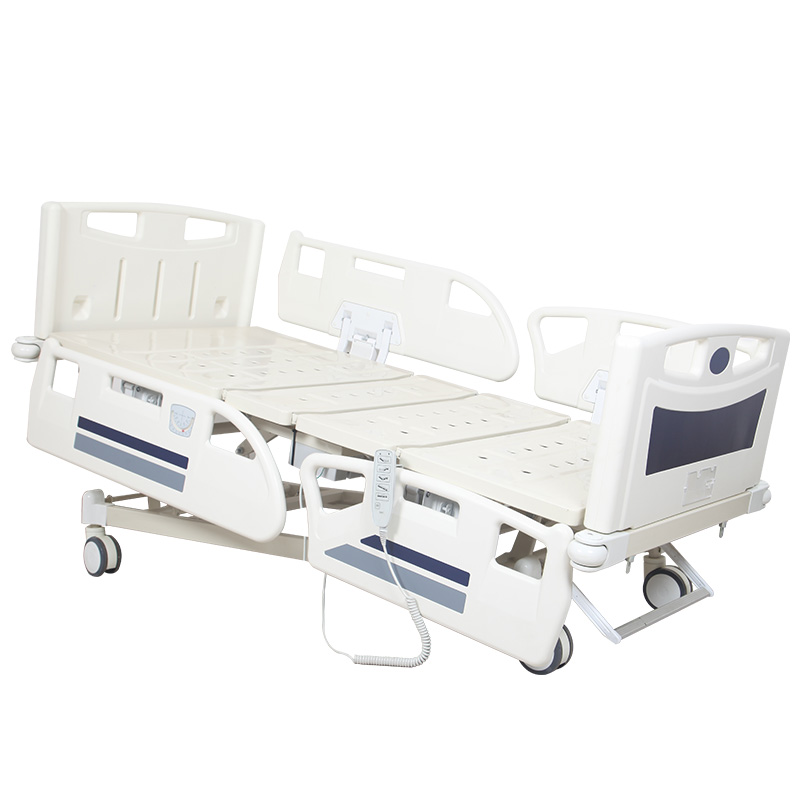
Before sample approval, ask for a photo of the final hand control face. Compare every icon with the quoted functions: backrest, knee section, height adjustment, Trendelenburg option, reverse position, or lock function if available. The label should match the real bed, not a generic catalogue image.
Think about the first-time user
A good hand control does not require a long explanation for basic movement. Up and down arrows should be positioned logically. Similar functions should be grouped clearly. The user should not need to guess whether an icon means backrest angle, whole bed height, or knee adjustment.
This matters in home care and facility settings where new caregivers may rotate often. If the handset is confusing, the distributor receives service calls that are not true technical failures. Clear labels prevent simple misunderstandings from becoming warranty discussions.
Language, icons, and market expectations
Some buyers prefer icon-only remotes because they can serve several language markets. Others want English words or a local language overlay. Both approaches can work if the design is clean and durable. The important point is to decide before production and confirm whether the printing method can handle the expected use.
For private-label orders, check whether the supplier can apply your logo or model reference without crowding the functional icons. Branding should not make the handset harder to read. The remote is a working tool first and a branding surface second.
Button feel and spacing
Labels are visual, but button feel also affects confidence. Buttons should have enough spacing for older users and caregivers wearing gloves. The press should feel deliberate, not loose or sticky. If the handset has a lock key, it should be difficult to activate accidentally but not impossible to understand.
During sample testing, operate the handset while standing beside the bed, sitting near the bed, and reaching across the side rail. The remote may feel fine in hand but become awkward when the cable angle or holder position changes.
Cable strain and storage position
The handset holder, cable clip, and related accessories should be approved with the remote, not after shipment.
When checking the handset, buyers should also review related accessories, confirm whether the remote layout is shared with the selected nursing bed model, and keep the approved version aligned with the product list.
The handset label is only useful if the handset survives daily handling. The cable should have proper strain relief where it enters the remote body. The holder should keep the remote visible and reachable without letting the cable fall near castors or moving frame sections.
Ask the supplier for photos showing the remote stored on the bed. If the holder is optional, include it in the quotation discussion. A missing holder often leads to dropped remotes, pulled cables, and preventable service issues.
Cleaning and print durability
Hand controls are touched often and cleaned often. The printed icons must resist normal wiping and daily wear. Buyers should ask about the printing method, surface film, or label durability. A handset that works electrically but loses its icons after months of use will still create complaints.
Do not make unsupported chemical claims in your local marketing unless you have evidence. Instead, confirm the supplier's recommended cleaning method and share it with customers. Clear, modest instructions are safer than broad promises.
Private label approval workflow
For OEM or distributor branding, create a simple approval sheet before mass production. It should include handset photo, icon meaning, cable length, connector type, holder style, logo placement, and final artwork. Ask the supplier to confirm that production will follow this approved sheet.
If the electrical system vendor changes, repeat the approval. A new handset may have the same shape but different icon spacing, cable feel, or connector detail. Small changes can affect user confidence and spare part management.
How to inspect before shipment
During inspection, test every handset button on a powered bed. Confirm that each button moves the correct section in the correct direction. Check label alignment, printing clarity, cable strain relief, connector fit, and holder placement. Take close-up photos of the handset face and connector.
For large orders, inspect several units across different cartons. This helps catch mixed handset versions or labeling errors. A handset mistake is easier to correct before shipment than after the beds are distributed.
Procurement advice
When comparing quotations, ask whether the hand control is standard, customized, or tied to a specific control system. Confirm replacement availability and minimum order quantity for spare remotes. The cheapest handset can become expensive if spare parts are hard to source.
A clear, durable, correctly labeled hand control makes an electric care bed easier to sell and easier to support. Buyers who confirm it early avoid many small service problems later.
Confirm the spare handset strategy
For service teams, keep the handset version connected with the exact nursing bed model that uses it.
Hand controls are small enough to be overlooked in purchasing, but they are one of the most common parts requested after delivery. A buyer should know whether the handset is a standard spare, whether it is shared with other bed models, and how it is identified in the supplier's parts list. If the dealer cannot order the correct replacement quickly, a simple remote problem can stop a bed from being used.
Ask the supplier to mark the handset model in the technical file and quotation. The connector type, number of buttons, cable length, and label artwork should all match the approved bed. If the supplier offers several similar handsets, request close-up photos of the correct spare so the service team does not confuse them later.
Check the holder before approving the remote
The holder is part of the remote experience. A good holder keeps the hand control visible, stable, and easy to return after use. A weak holder lets the remote fall, twist, or hang by the cable. In home care, this may lead to cracked cases. In facilities, it may lead to missing remotes or damaged cables after cleaning.
During sample review, place the remote in the holder from different positions around the bed. Check whether it fits when the side rail is raised, when the head section is lifted, and when the bed is close to a wall. If the holder location forces the cable across a moving part, the design should be adjusted before bulk production.
Make the label artwork part of the signed sample
The approved artwork should also match the naming used in the product list.
For private-label orders, label artwork should not be handled casually by email after the sample is approved. Put the final artwork into the signed sample file. Include the exact icon layout, logo position, background color, and any text. This avoids the common problem where the mechanical sample is approved but the printing file is still uncertain.
Artwork approval should include the buyer's sales and service people, not only the purchasing manager. Sales teams know what customers ask during demonstrations. Service teams know which icons create confusion. Their comments can prevent a small design mistake from becoming a repeated training issue.
Consider aging users and low-light rooms
Many electric care beds are used by older people or by caregivers working at night. Icons that look fine on a computer screen may be too small on the real handset. Low contrast printing, crowded symbols, or glossy surfaces can make the remote harder to read. Ask for a real photo, not only a digital artwork file.
If the bed is intended for home care, the remote should be understandable without a nurse standing beside it. If the bed is intended for institutions, staff may use it quickly during routine care. In both cases, clear visual hierarchy matters. The most common movements should be easiest to find.
Include the handset in user training material
A short user sheet should show the actual hand control supplied with the bed. Do not use a generic remote image unless it is identical. Mark the main buttons, the storage position, and any lock or special function. This small document helps dealers, installers, and end users speak the same language when they call for support.
For distributors, handset clarity can become a selling point. It shows that the product is not only electrically functional but also easy to live with. Buyers who control this detail early usually see fewer basic operation complaints after delivery.
Check compatibility with bed position labels
If the bed frame has labels, warning stickers, or function markings, the handset language should not contradict them. A remote icon that suggests one movement while the bed label describes another creates doubt. Keep terminology consistent across the handset, manual, carton label, and sales material.
This matters when a distributor translates documents locally. The supplier may provide English artwork, while the buyer prepares local-language instructions. Before printing, compare the terms line by line. Consistency prevents avoidable support calls and helps the product feel more professionally prepared.
Plan for mixed user groups
An electric care bed may be used by a patient, family caregiver, nurse, technician, or delivery installer. Each group reads the handset differently. The patient wants simple comfort movement. The caregiver wants safe routine operation. The technician wants to identify functions quickly during service. The buyer should consider all of them.
A good handset label does not need to explain everything, but it should make common actions obvious and reduce the chance of pressing the wrong function. For export buyers, this usability detail can be more valuable than adding another feature that few users understand.
Final approval should be physical, not only digital
Before mass production, ask for a real handset photo or sample with the final label. Digital artwork can hide scale, gloss, button depth, and contrast problems. Hold the remote at normal working distance and check whether the main functions are still clear. This physical approval is a small step, but it prevents mistakes that are expensive to correct after hundreds of beds are shipped.
Related pages buyers should review for electric bed controls
When confirming hand control labels, compare the function set with the relevant hospital bed and nursing bed models. If the order includes a handset holder, spare remote, cable clip, or other accessories, include those items in the same approval sheet. The product list can help buyers keep model names, button layouts, and spare part records aligned.
For private-label artwork or control system confirmation, ask the factory for real photos and keep the supplier's company information in the purchase file. Final artwork, cable length, and spare handset questions should be sent through the contact page before production starts.