
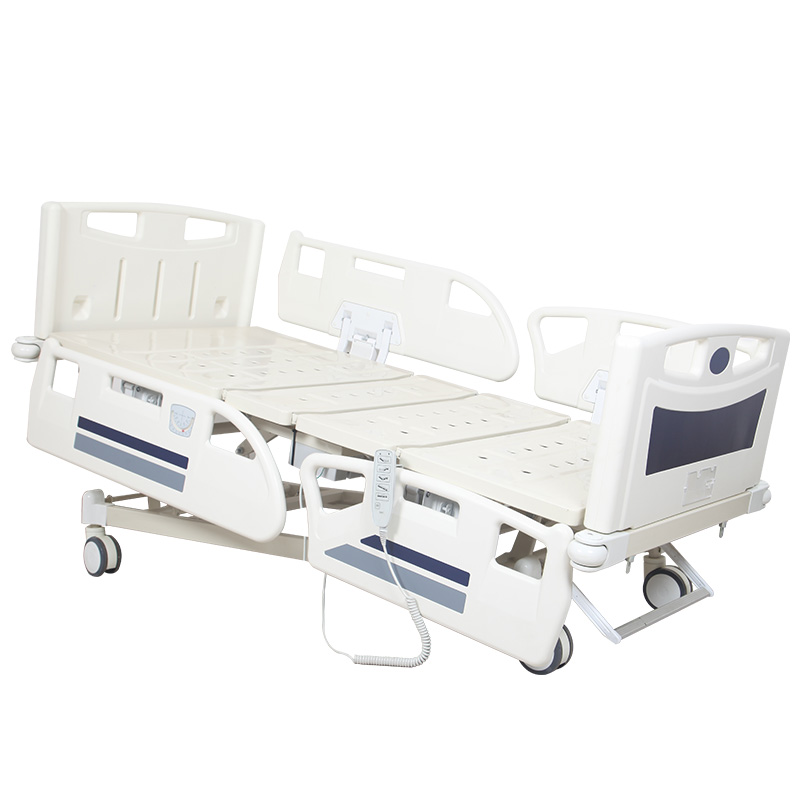
A buyer compares two 5-function electric hospital beds. Both beds provide backrest adjustment. Both provide leg-section adjustment. Both provide height adjustment. Both provide Trendelenburg and reverse Trendelenburg positioning. On the specification sheet, the two beds appear very similar. But when the buyer looks at the control system, the difference becomes obvious. Bed A has one simple handheld controller. Bed B has controls integrated into the side rails, plus an additional caregiver or nurse control panel. This raises an important procurement question: Which electric hospital bed control system is actually suitable for the project? The answer should not be based simply on which bed has more buttons. Handsets, side-rail controls and nurse control panels serve different purposes, and the correct configuration depends on the hospital environment, intended users, required functions and project specification. For buyers comparing an Electric Hospital Bed, the control system should therefore be evaluated as a separate part of the product configuration rather than treated as a small accessory. For example, a 5-function electric hospital bed may provide movements such as backrest adjustment, leg adjustment, height adjustment and two directions of whole-bed tilt. This distinction is important. One may use only a handset. Another may combine a handset with side-rail controls. A more advanced configuration may include patient-side controls, caregiver-side controls and a separate nurse control panel. It is usually connected to the bed's electrical control system and provides buttons for selected bed movements. A straightforward handset can make the operating interface easy to understand. This depends on the intended use and procurement requirements. Do not assume the number of buttons from the number of bed functions. A complete operating video can help show which bed movement corresponds to each control. Control symbols and button layout should correspond to the actual product configuration. Therefore, the approved control interface should be part of the product confirmation process. This can place selected controls closer to the person using the bed or the caregiver. The functions available from each position can also differ. A control interface accessible from inside the bed may be intended for selected patient-operated functions. For example, a manufacturer may design the control architecture so that certain movements are available only through designated caregiver controls. An electric hospital bed can provide several powered movements, but access to those movements may be managed differently depending on the product design and care environment. Which functions can the patient access? Which functions can the caregiver access? Can selected functions be restricted? Depending on the electric hospital bed design, it may provide access to multiple bed functions from one dedicated panel. Do not assume every panel called a “nurse control panel” provides identical functions. Different bed designs place caregiver controls in different positions. The correct configuration depends on the selected hospital bed. Instead of relying only on the patient's handset or side-rail interface, staff can have a dedicated control position. A general ward project and an ICU project may have different requirements. Bed A has eight buttons. Bed B has twelve buttons. Bed C has a handset, two side-rail panels and another caregiver panel. The buyer should first determine which functions and control permissions are actually required. Depending on the bed's control architecture, authorized caregivers may be able to prevent selected functions from being operated through another control interface. If function lockout is required, specify it clearly during procurement. The purpose is not simply to create another powered movement. It should not be counted as an additional bed movement function. Different control systems can provide different configurations. Can individual movements be restricted? Is the restriction controlled from a caregiver panel? Which other controls are affected? Both interfaces may command some of the same powered movements. It can provide a simple interface connected to the bed. They can place selected controls at defined locations on the rail. A nurse or caregiver control panel may provide a different level of access depending on the configuration. The control architecture can include multiple interfaces connected to the same overall electrical system. Side-rail controls can provide convenient access near the bed. This depends on the product design. Create a simple list of every powered bed function. Even beds with the same movement count can use different control arrangements. This prevents assumptions from becoming purchasing specifications. Depending on the selected model and project, buyers may require additional caregiver-oriented control features. Then the manufacturer can propose the appropriate control architecture. A simpler electric hospital bed may appropriately meet the defined requirements. Then select the functions and controls. A three-function electric hospital bed may provide backrest, leg and height adjustment. Which handset is supplied? Are controls integrated into the rails? Are caregiver controls included? Can functions be restricted where required? A front-angle product photograph may not show the complete control arrangement. Therefore, request close-up photographs. The button layout should be clearly visible. Where applicable, show the controls accessible from inside the bed. Show any external rail controls or staff interface. Where included, show the complete panel and button layout. Ask the supplier to demonstrate the control interface. Show the relevant function operating normally. Then show how the approved control restriction works according to the bed design. Imagine a distributor approves a sample with one handset layout. Training materials may no longer match. Product photos may no longer match. Customer expectations may no longer match. Several years after installation, a customer may need a replacement handset. Connector and control-system compatibility can differ. Two handsets may both have eight buttons. These can include connector type, control architecture and model configuration. A panel installed in one side rail may look similar to another. This is particularly useful for distributors supporting a large installed fleet. It needs to be compatible with the selected control architecture. The manufacturer can then confirm the correct system configuration. A buyer may purchase a simple handset-controlled bed and later ask to add integrated side-rail controls or a nurse panel. Therefore, future upgrade possibilities should be discussed with the manufacturer before purchase if they matter to the project. They connect to the wider electrical control system. Buyers do not necessarily need to become electrical engineers. The same applies to control panels and related electrical components. A connector that physically fits does not automatically prove system compatibility. A handset-only bed and a bed with several control interfaces may respond differently to the loss of one control device. For large hospital projects, understanding the control architecture can support spare-parts planning. There is no universal quantity that applies to every distributor. If every model uses completely different operating logic, staff training and spare-parts management can become more complicated. Forcing them into one identical configuration may not be appropriate. Different bed types can meet different requirements while still maintaining reasonable consistency where possible. Their design and cleaning requirements should be understood according to the manufacturer's instructions and facility procedures. This is particularly important for integrated control interfaces. But projects may still have specific labeling or language requirements. This can include labels, branding and other agreed control-related markings. Create a structured control-system check. For example, a required caregiver-only function may be accessible from the wrong interface. Does the bed perform the movement? Does the correct control interface provide access to that movement? Different user groups may require different levels of access. Then compare it with the hospital requirement. For a bulk order, production units should match the approved configuration. Even if both operate the bed, this can create unnecessary complexity. OEM distributors may also face inconsistent customer documentation. If this affects the approved configuration, the buyer should be informed according to the agreed change-control process. Does the button layout change? Does compatibility change? Does the spare-part reference change? Does the control logic change? Catalogue images. Training videos. User guidance. Spare-parts lists. Do not simply write: “Same as last order.” For example: “Electric hospital bed with controller.” Every additional requirement can affect product complexity and price. This allows suppliers to quote a compliant base configuration and identify optional upgrades separately. For example, the supplier may be able to quote: The buyer can see which control-system upgrade contributes to the configuration difference. A distributor can then position each configuration more clearly. A more complex control architecture may be appropriate for another. Who operates the bed? Which functions need to be accessible? Which functions need controlled access? What training environment exists? What spare-parts strategy will be used? Handset, side-rail controls and caregiver panels should be clearly identified. Do not assume it controls every bed movement. If yes, identify which functions are accessible. Ask what additional access they provide. Confirm whether it is standard or optional. Ask how it works on the exact model. Do not assume all lockout systems operate identically. Confirm that the complete electrical architecture matches the approved configuration. This is important for long-term service. Confirmed compatibility can simplify spare-parts management. Ask for a complete video or sample evaluation. Include the control configuration in production approval. What does the bed need to do? Who should be able to operate each movement? Which handset, side-rail controls and caregiver panels provide that access? This single question changes the purchasing process. The result is a product specification built around actual use rather than the number of visible buttons. There is no universal answer that applies to every hospital bed project. A handset-only system may be appropriate for a straightforward electric bed configuration. Integrated side-rail controls can provide another method of accessing selected functions. A dedicated nurse or caregiver control panel can provide additional staff-oriented control capability depending on the bed design. Some projects may require a combination of these interfaces. Others may not need every available option. The correct decision should be based on: Required Functions + Intended Users + Control Access + Care Workflow + Lockout Requirements + Serviceability + Project Budget. Just as the number of actuators does not define the number of bed functions, the number of buttons does not define the quality of the control system. A professional buyer should understand: What functions the bed provides. Who can operate those functions. Which control interface provides access. Which functions can be restricted where required. How the controls connect to the complete electrical system. Whether replacement components can be identified and supplied. And whether mass production will match the approved control configuration. The purchasing process should therefore follow this logic: Bed Functions → User Access → Control Interface → Control Logic → Verification → Production Consistency → After-Sales Support. This gives buyers a much clearer understanding of the electric hospital bed they are actually purchasing. Hebei Heyuan Medical Equipment Co., Ltd. manufactures electric hospital beds, 5-function hospital beds, 3-function electric hospital beds, ICU hospital beds and related patient-care equipment for distributors, importers and healthcare projects. Buyers can review our Electric Hospital Bed range for different hospital, distributor and project requirements. For handset configurations, side-rail controls, nurse control panels, OEM requirements, bulk orders or project quotations, please contact us with your required bed functions, control configuration, quantity and destination market.Two Electric Hospital Beds Have the Same Functions — Why Are Their Controls Completely Different?
Start by Separating Bed Functions From Bed Controls
The Functions Describe What the Bed Can Do
The Controls Describe How Those Functions Are Accessed
Two Beds Can Provide the Same Five Movements but Use Different Control Interfaces
Same movement functions do not automatically mean the same control system
What Is a Hospital Bed Handset?
The Handset Is One of the Most Familiar Electric Bed Controls
The Exact Button Layout Depends on the Bed Configuration
A Basic Handset May Control Functions Such As
Not every handset provides access to every function available on the bed
Why a Handset-Only Configuration Can Be Attractive
Simplicity Is One Advantage
It Can Also Simplify the Product Configuration
For Some General Hospital Projects, a Handset-Based System May Be Appropriate
More control panels are not automatically necessary for every hospital bed
But “Handset Included” Is Not a Complete Specification
Buyers Should Ask What the Handset Actually Controls
Ask for a Clear Photograph of the Actual Handset
Then Ask the Supplier to Demonstrate Every Button
The handset shown should match the configuration being quoted
Button Symbols Matter More Than Many Buyers Expect
The User Should Be Able to Understand the Intended Function
Do Not Approve the Bed Based Only on a Generic Controller Photo
Different Bed Versions May Use Different Handsets
What appears in the catalogue should not automatically be assumed to be the production version
What Are Side-Rail Controls?
Some Electric Hospital Beds Integrate Control Buttons Into the Side Rails
The Exact Arrangement Varies by Model
Controls May Be Located on the Inside, Outside or Both Sides of a Rail Depending on the Design
Never assume every side-rail control panel has the same operating logic
Patient-Side and Caregiver-Side Controls Are Not Necessarily the Same
This Is an Important Detail for Hospital Buyers
An Outside-Facing Interface May Be Intended for Staff Access
The Available Buttons Can Be Different
The exact configuration must be confirmed for the specific model
Do Not Assume the Patient Should Control Every Bed Movement
This Is Why Control Access Matters
Some Functions May Require Caregiver Control According to the Selected Configuration
Buyers Should Ask
These questions are more useful than simply asking how many buttons the bed has
What Is a Nurse Control Panel?
A Nurse Control Panel Provides an Additional Caregiver Control Interface
It May Also Provide Additional Control Features Depending on the Model
The Exact Capabilities Must Be Confirmed
The name describes the general purpose, not a universal technical specification
Where Is the Nurse Control Panel Located?
There Is No Single Universal Location
Some May Be Integrated Into the Bed Structure
Others May Use a Separate Control Unit
Ask for actual product photos rather than relying only on a written description
Why Can a Nurse Control Panel Be Useful?
It Can Centralize Access to Bed Functions for Caregivers
This Can Be Particularly Relevant in More Complex Hospital Bed Configurations
But the Value Depends on the Project
Do not add a complex control panel simply because it looks more advanced
More Buttons Do Not Automatically Mean a Better Hospital Bed
This Is a Common Purchasing Mistake
It Is Easy to Assume Bed C Must Be Better
That Is Not a Reliable Comparison
Control complexity should match the intended care environment
What Is Function Lockout?
Function Lockout Generally Refers to Restricting Access to Selected Powered Movements
The Exact Lockout Capability Varies by Product
Do Not Assume Every Electric Hospital Bed Includes This Feature
Ask the manufacturer to demonstrate exactly how it works on the quoted model
Why Lockout Should Not Be Treated as Just Another Button
It Changes Control Access
It Affects Which Existing Functions Can Be Accessed From Certain Controls
This Is Why It Belongs Under Control-System Requirements
Separate movement functions from control-management features
Ask Which Functions Can Be Locked Individually
Do Not Assume “Lockout” Means Everything Is Disabled at Once
Ask the Supplier to Show the Exact Lockout Logic
For Example
Model-specific demonstration is better than a generic description
Handset vs Side-Rail Controls — What Is the Real Difference?
The Main Difference Is Not the Electric Bed Function Itself
The Difference Is How and Where the User Accesses Them
A Handset Is a Separate Control Device
Side-Rail Controls Are Integrated Into the Bed Structure
The better option depends on the required workflow and product design
Handset vs Nurse Control Panel — They Serve Different Users
A Handset May Be Designed for Straightforward Daily Bed Adjustment
Do Not Assume One Must Replace the Other
Some Beds Use Both
Buyers should define who needs to control what
Side-Rail Controls vs Nurse Control Panel — Why Might a Bed Have Both?
Because Control Location and Control Authority Are Different Questions
A Dedicated Caregiver Panel Can Provide Another Control Point
The Two Interfaces May Not Offer Exactly the Same Functions
Ask for a function-by-control matrix before approving a complex configuration
What Is a Function-by-Control Matrix?
This Is a Very Useful Procurement Tool
Then Identify Which Control Interface Can Operate It
For Example, the Matrix Can Record
The actual access pattern should be filled in according to the selected bed model
Do Not Copy a Generic Control Matrix From Another Hospital Bed
Control Logic Is Model-Specific
Get Written Confirmation From the Supplier
Then Verify It on the Sample
Confirmed configuration is more reliable than copied industry assumptions
Why Control-System Configuration Matters for ICU Beds
ICU Beds Can Have More Complex Operating Requirements
This Does Not Mean Every ICU Bed Uses the Same Panel
The Tender or Hospital Requirement Should Define the Needed Functions
ICU should not be used as a shortcut for “maximum number of buttons”
Why General Ward Beds May Need a Different Approach
Not Every Ward Requires the Most Complex Control Configuration
This Can Reduce Unnecessary Complexity
Start With the Care Environment
Do not start with the most expensive control panel and work backward
A 3-Function Electric Hospital Bed Can Still Have Different Control Options
Control-System Questions Are Not Limited to 5-Function Beds
But Buyers Still Need to Know How Those Functions Are Controlled
Ask
Movement count alone does not answer these questions
Why a Product Photo Can Mislead Control-System Comparison
Side-Rail Buttons May Be Difficult to See in a Catalogue Image
Some Controls May Be on the Opposite Side of the Rail
A Caregiver Panel May Also Be Hidden From the Main Product View
Control interfaces deserve their own product documentation
Ask for Four Types of Control-System Photos
1. Handset Front View
2. Patient-Side Rail Control View
3. Caregiver-Side Control View
4. Nurse Control Panel View
These images make quotation comparison much easier
A Video Should Show Who Can Control Each Function
Do Not Ask Only for a Video of the Bed Moving
For Each Important Function, Show Which Button Is Used
If Lockout Is Included, Demonstrate It Too
This is more useful than a promotional video with music and fast camera cuts
Control Layout Should Be Consistent With the Approved Production Bed
This Matters for Large Orders
The Production Shipment Arrives With a Different Controller
Even if the basic bed movements remain similar, This Can Create Problems
Control configuration should be included in sample and production approval
Record the Handset Model Where Available
This Helps Future Spare-Parts Support
“Six-Button Hospital Bed Controller” May Not Be Enough Information
Similar-Looking Handsets Are Not Automatically Interchangeable
Use the correct component identification for replacement
Do Not Order a Replacement Handset by Counting Buttons
This Is a Common Maintenance Mistake
They Can Still Belong to Different Control Systems
Compatibility May Depend on Several Factors
Confirm the approved replacement part with the manufacturer
The Same Principle Applies to Side-Rail Control Panels
Appearance Alone Does Not Prove Compatibility
But Internal Connections and Control logic Can Differ
Record the Correct Bed Model and Component Reference
Good records reduce after-sales confusion
The Nurse Control Panel Is Part of a Complete Electrical System
Do Not Treat It as an Independent Universal Accessory
Adding a Panel Is Not Necessarily as Simple as Plugging It Into Any Electric Bed
If the Project Requires a Nurse Control Panel, Specify It Before Production
Control architecture should be planned as a system
Can a Basic Electric Hospital Bed Be Upgraded Later?
Do Not Assume the Answer Is Always Yes
Whether This Is Possible Depends on the Original Product Architecture
The Existing Control Box, Wiring, rails and other components may affect compatibility
Do not build a procurement plan around an unconfirmed future modification
Control Box Compatibility Matters
The Control Interfaces Do Not Work in Isolation
The Control Box Configuration Must Support the Intended Interfaces
This Is Why Two Beds With Similar Handsets Can Still Use Different Internal Systems
But they should ask the supplier to confirm system compatibility
Do Not Mix Components From Different Control Systems Without Confirmation
A Handset From One Bed Should Not Be Assumed to Work With Another
Use Manufacturer-Approved Components and Service Procedures
Electrical Compatibility Is More Than Connector Shape
Replacement decisions should be based on documented component information
What Happens if the Handset Is Damaged?
The Effect Depends on the Bed's Control Architecture
Do Not Assume Other Controls Will Always Provide the Same Functions
Ask the Manufacturer About the Exact Configuration
After-sales planning should begin before components fail
Should a Distributor Keep Spare Handsets?
This Depends on the Installed Fleet and Service Strategy
Consider the Installed Component Population
Also Consider
Do not buy random spare controllers without knowing which beds they support
Control Standardization Can Help Large Hospital Projects
Imagine a Hospital Purchases Several Electric Bed Models
Controlled Standardization Can Be Valuable
Where Appropriate, Buyers Can Consider Consistency in
This does not mean every bed in the hospital must be identical
Standardize What Helps Workflow — Differentiate What the Care Environment Requires
An ICU Bed and a General Ward Bed May Not Need the Same Control System
Instead, Look for Logical Product Families
The Goal Is Manageable Variation
Product standardization should support the project rather than override it
Do Not Forget Cleaning When Evaluating Control Panels
Controls Are Frequently Touched Surfaces
Do Not Use Unapproved Cleaning Methods
Ask for Relevant Cleaning and Maintenance Guidance
Daily operation includes more than pressing buttons
Control Labels Should Match the Destination Market Requirements
Symbols Can Reduce Dependence on Text
Discuss These Requirements Before Mass Production
For OEM Orders, Confirm Artwork Early
Do not wait until final inspection to discover a labeling requirement
What Should Buyers Check During Sample Evaluation?
Do Not Simply Press Every Button Once
Start With the Approved Function List
Then Verify
The sample should represent the configuration intended for production
Test the Control Logic, Not Just the Movement
The Bed May Move Correctly but Still Have the Wrong Control Configuration
Or a Required Lockout Feature May Not Be Included
Therefore, Verify Both Questions
Both are part of the product configuration
Do Not Assume Every Button Should Work From Every Panel
This Can Actually Indicate That the Buyer Has Not Defined the Control Requirement
The Correct Logic Depends on the Product and Project
Ask the Manufacturer to Explain the Intended Access Structure
Control access should be deliberate, not accidental
Verify the Control Configuration Again During Pre-Shipment Inspection
Sample Approval Is Not the End of the Process
Control Interfaces Are Easy to Identify During Inspection
Check
Use the approved specification as the reference
For a 200-Bed Project, Control-System Consistency Matters
Imagine Half the Shipment Uses One Handset and the Other Half Uses Another
Staff Training Becomes Less Consistent
Spare-Parts Management Can Also Become More Difficult
Large orders should define acceptable production consistency
Do Not Allow Unapproved Control-System Substitution
A Supplier May Occasionally Need to Change a Component
“Equivalent” Should Not Be Assumed Automatically
Ask What Changed
Component changes should be evaluated in context
Why Control-System Changes Matter to Distributors
A Distributor May Have Already Created Product Materials
A New Control Interface Can Affect All of Them
This Is Why Repeat Orders Should Reference the Previous Approved Configuration
Use model and revision information where available
How Should the Control System Be Written in an RFQ?
Avoid Vague Requirements
This Leaves Too Much Open to Interpretation
A Better RFQ Can Define
Then ask the supplier to explain the proposed configuration
Do Not Specify Features You Do Not Actually Need
A Long RFQ Is Not Automatically a Good RFQ
Start With the Actual Hospital Requirement
Separate Mandatory Features From Preferred Features
Requirement-driven procurement is more effective than feature accumulation
Ask Suppliers to Quote Control Options Separately When Appropriate
This Helps Buyers Understand the Cost Difference
The exact options depend on the manufacturer's product architecture
This Makes Budget Decisions More Transparent
Instead of Seeing Only Two Different Bed Prices
This Is Particularly Useful for Distributors
Different Customers May Need Different Versions of the Same Product Family
Product segmentation becomes easier when options are documented
Do Not Compare Control Systems Only by Price
A Cheaper Handset-Based System May Be Completely Appropriate for One Project
Neither Conclusion Can Be Made From Price Alone
Compare Against the Requirement
The best configuration is the one that appropriately matches the defined project requirements
12 Questions to Ask Before Choosing an Electric Hospital Bed Control System
1. Which Control Interfaces Are Included?
2. Which Functions Can the Handset Operate?
3. Are There Patient-Side Controls?
4. Are There Caregiver-Side Controls?
5. Is a Nurse Control Panel Included?
6. Is Function Lockout Available?
7. Which Functions Can Be Restricted?
8. What Control Box Supports the System?
9. Can Replacement Handsets and Panels Be Supplied?
10. Are Control Components Shared Across Other Bed Models?
11. Can the Supplier Demonstrate Every Control Function?
12. Will the Mass-Production Controls Match the Approved Sample?
These questions provide a much clearer picture than asking only whether the bed has a handset
A Simple Three-Level Way to Compare Electric Hospital Bed Controls
Level 1 — Movement Requirement
Define the required electric movements first
Level 2 — User Access
Patient, caregiver or other authorized user access should be defined according to the project
Level 3 — Control Hardware
This sequence prevents buyers from selecting hardware before defining the workflow
Do Not Start With “I Want the Bed With the Most Controls”
Start With “Who Needs to Control Which Functions?”
It Moves the Discussion From Appearance to Workflow
Then the Manufacturer Can Recommend or Confirm the Appropriate Control Configuration
That is a more professional way to purchase electric hospital beds
Handset, Side-Rail Controls or Nurse Control Panel — Which Should You Choose?
Do Not Buy an Electric Hospital Bed by Counting Buttons